

Lovable
The perfect prompt guide for Lovable
How to structure instructions for Lovable so you go from vague idea to published app, without messy interfaces.
 Carmen Gerea15 iulie 20268 min read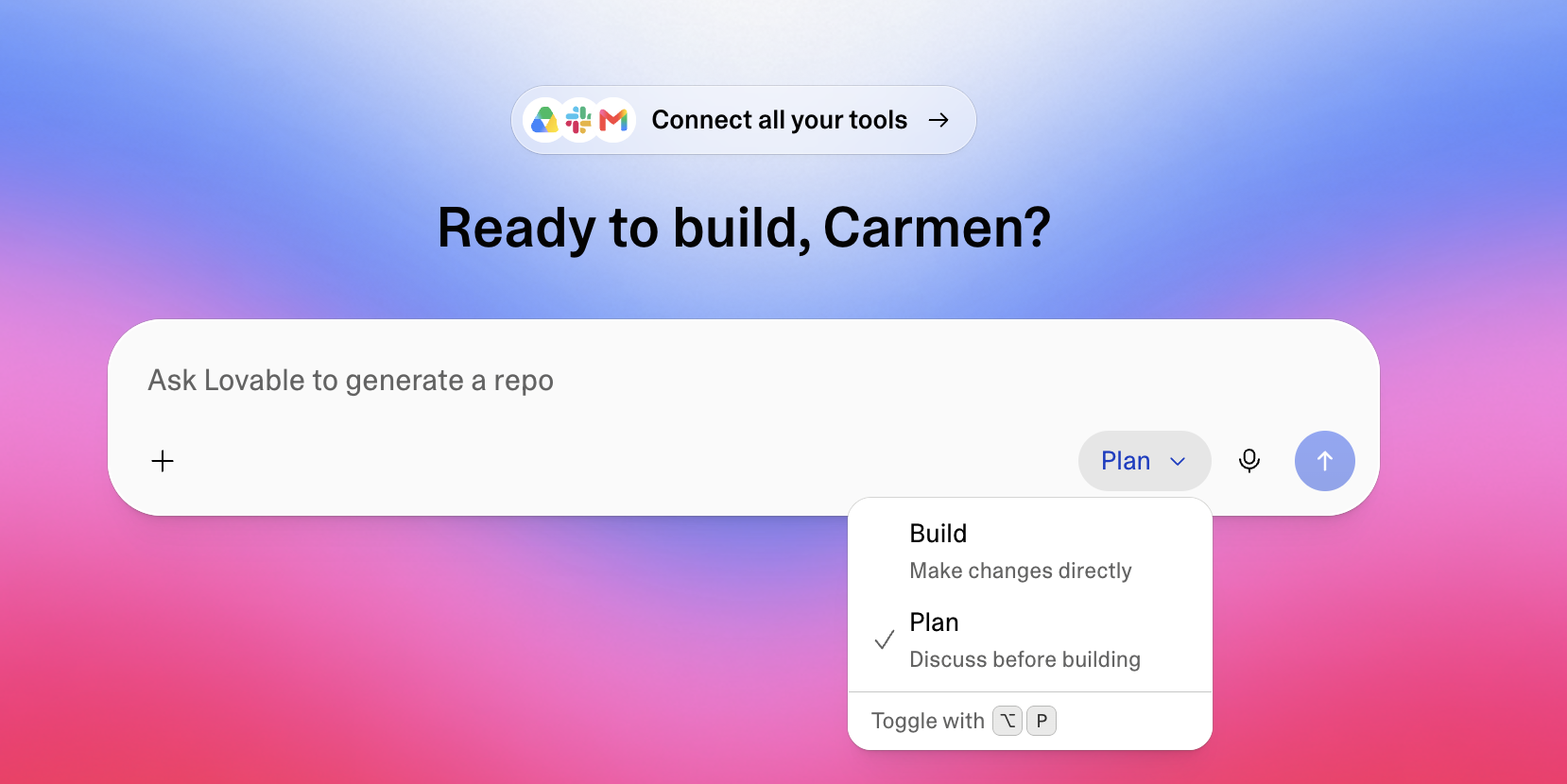
În acest articol
The rise of vibe coding has completely transformed how we create software: traditional design and programming have been replaced by the ability to write high-level instructions. Lovable has consolidated itself as one of the most powerful tools to materialize ideas, taking you from a simple text prompt to a working, published application in just a few minutes. Still, to get professional-grade results and avoid generic or chaotic interfaces, you need to master the art of prompting. Below is a detailed guide, based on expert best practices and the official documentation, to structure the perfect prompt in Lovable.
Plan first: don't prompt at random
Before writing your first instruction in Lovable, structure your vision. Vague ideas produce vague results. Clearly define these four pillars:
- The object: what exactly are you building? (e.g. a landing page, a habit-tracking app, a booking portal).
- The purpose: who are your users, what problem does the app solve for them and what is the main call to action?
- Personality and mood: set the site's energy with emotional words (e.g. minimalist, warm, disruptive, professional).
- Visual anchors: identify references with excellent aesthetic quality that you want to emulate (e.g. "editorial design in the style of Apple Notes or Airbnb").
The structure of the perfect prompt
A robust, professional prompt for Lovable should be structured into four key blocks:
- A. High-level context (reframing): don't limit Lovable by defining your project only by its standard technical category. Raise the level of abstraction to immediately guide design, typography and use of negative space. Basic: "Design a website for a speaker brand." Advanced: "The product is a visual sculpture. Present it as such, with a design that prioritizes minimalist aesthetics and airy space."
- B. Design system and tech stack: don't let the AI improvise the aesthetic foundation. Set preferred technologies (React, Tailwind CSS, Framer Motion), visual rules and spacing (8pt system, 20px radius) and the color palette. Clarify whether you prefer solid colors or dark mode by default.
- C. Scope and build order: build reusable components before full pages: buttons, cards, text fields, modals. Once ready, structure the main sections and set an interaction philosophy instead of a rigid list of effects.
- D. Explicit constraints: clearly indicate what Lovable should NOT do. For example: "Don't use gradients; keep colors solid and simple. Only create the home page and navigation; don't add databases or other pages until I explicitly ask."
A structured, successful prompt example
To put these concepts into practice, here's an optimized template you can adapt to your own projects:
[CONTEXT AND MISSION] Act as my design and development partner. We're going to build a mobile-first web app for managing daily habits, aimed at creative professionals. The design should feel ultra-modern, tactile, clean and sophisticated, emulating the minimalist aesthetic of brands like Linear.
[GLOBAL DESIGN SYSTEM] Stack: React, Tailwind CSS, Framer Motion for fluid micro-interactions. Typography: Inter, type scale from xs to xl. High contrast between headings and body. Spacing and margins: 8pt spacing system, 20px (2xl) rounded corners and generous padding. Visual style: dark mode preferred. Solid colors (no gradients), using a pastel violet (#7A5FFF) as the main accent color.
[SCOPE OF STAGE 1] Start by defining only the main interface components (buttons with clean hover transitions, cards to visualize habits, text fields). Once these are defined, build the page structure for the Dashboard, which should include a task progress ring.
[CONSTRAINTS AND QUESTIONS] Don't use absolute fixed pixel widths; prioritize flexible, adaptive layouts (`w-full flex`). Before writing the actual structural code, please ask me in Plan Mode all the questions you consider necessary to validate that you've correctly understood the product vision.
Prompt ready to copy and paste
Act as my design and development partner. We're going to build [app type: landing page / web app / dashboard] for [target audience].

[GLOBAL DESIGN SYSTEM]
Stack: React, Tailwind CSS, Framer Motion.
Typography: [font name], type scale from xs to xl.
Spacing: 8pt system, 20px rounded corners.
Visual style: [light/dark mode], [solid/gradient] colors, main accent color [color code].

[SCOPE OF THIS STAGE]
Start by defining the reusable components (buttons, cards, text fields). Then build [main page/section] including [key element].

[CONSTRAINTS AND QUESTIONS]
Do not add [what you don't want yet: databases, auth, other pages] until I explicitly ask. Before writing code, ask me in Plan Mode the questions needed to validate the vision.
Golden tips to iterate successfully
In the end, prompting is a dialogue. Here's how to make it productive:
- Use "Plan Mode" for conceptualization. Before Lovable rushes to generate code, have a preliminary conversation in chat (Plan/Chat mode). Let the AI ask clarifying questions to nail down the app's logic.
- One task per prompt. Don't overload the AI with five complex changes in one message. Progress incrementally: solve one component or flow, test it, then move on.
- Visual polish comes last. Make sure architecture, database and core functionality are working perfectly before you spend time tweaking shadows, detail colors or complex animations.
- Use the version history. If a change didn't turn out the way you wanted, don't worry. Lovable lets you undo chat messages and roll back to a previous point in history to try another approach, without losing your stable progress.
By writing prompts with the mindset of a creative director rather than a technical writer, you'll turn Lovable's AI into a genuine top-tier development partner, letting you ship spectacular platforms in record time. Want to practice with the Black Sea community? Join us →
Autor
Carmen Gerea
Official Lovable ambassador in Chile. Founder, builder and community connector. Adapted for Black Sea Vibes.